Instagram Reels Downloader
Download Instagram Reels from their link. Paste a public Reel URL and save it as a 720p HD MP4 with its sound and no watermark, or keep just the audio as an MP3. Free, with no app and no login.
- 720p HD MP4
- No watermark
- MP3 option
- No login
Only save Reels you own or have permission to keep. Not affiliated with Instagram or Meta.
How to Download Instagram Reels in 3 Steps
Copy the Reel's link, paste it here and save the MP4. The same three steps work in the Instagram app and on instagram.com.
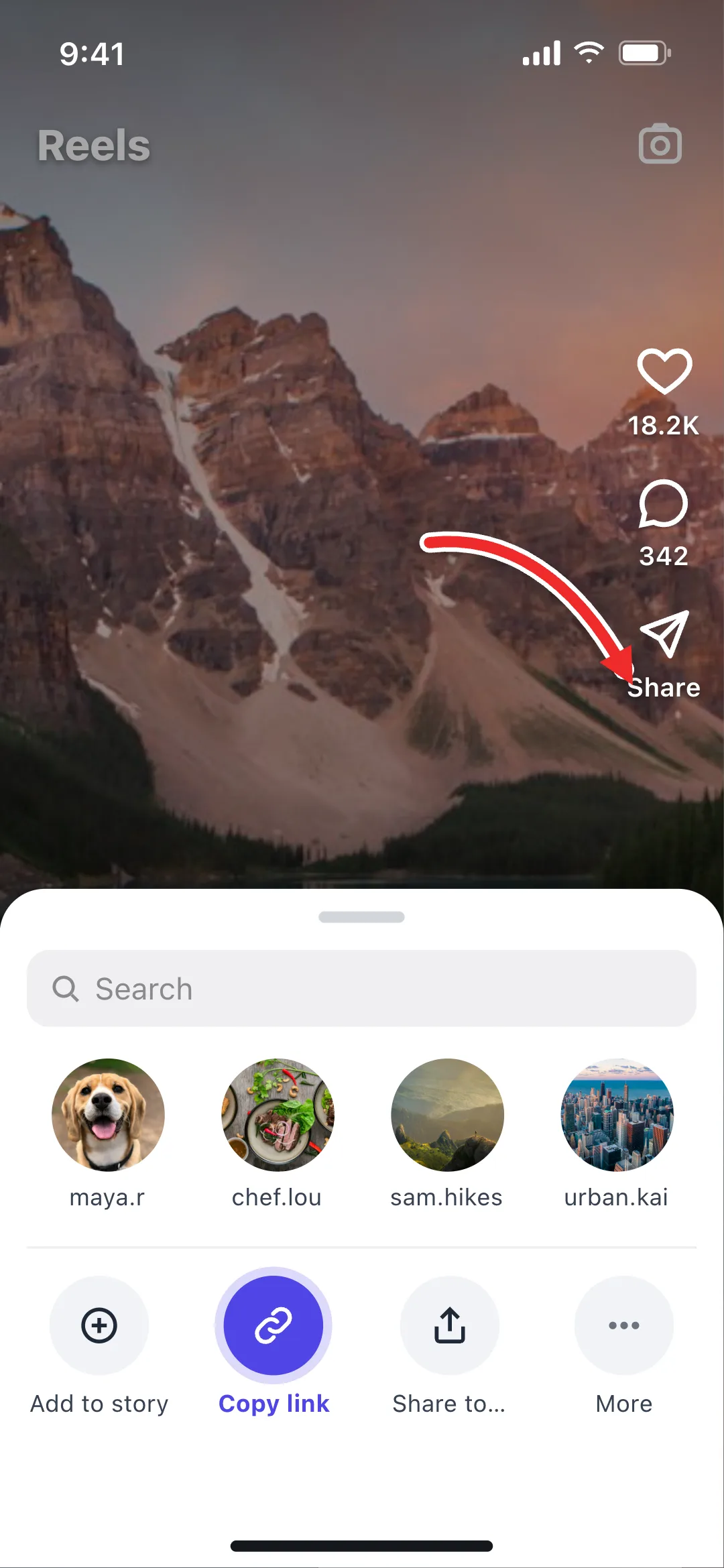 1
Copy the Reel Link
On the Reel, tap the paper-plane Share icon and choose Copy link. On a computer, open the Reel and copy the URL from the address bar.
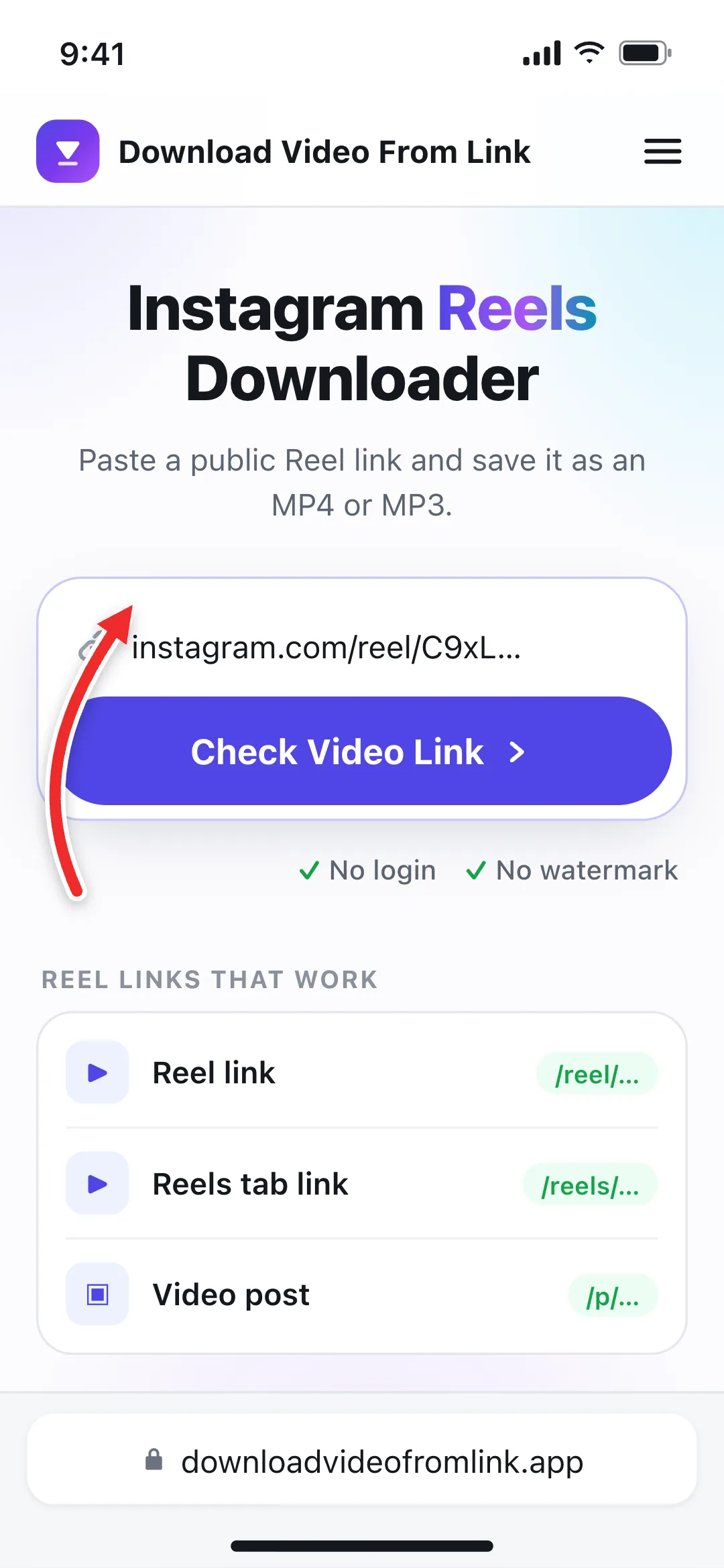 2
Paste It Here
Paste the link into the box at the top of this page and select Check Video Link, or tap Paste to fill it in and check it in one go.
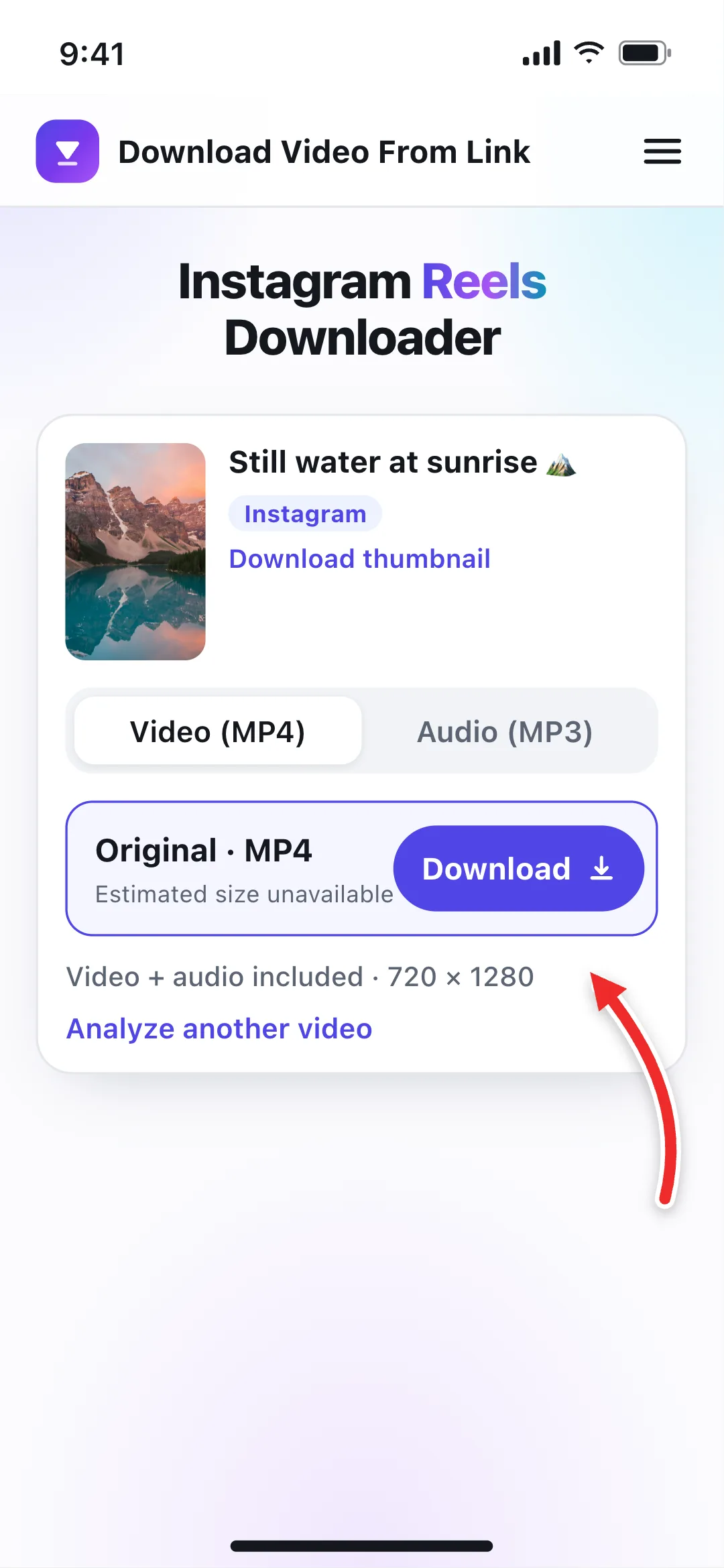 3
Save the Reel
Keep Original · MP4 selected and tap Download. Switch to Audio (MP3) first if you only want the sound.
Which Instagram Reel Links Work?
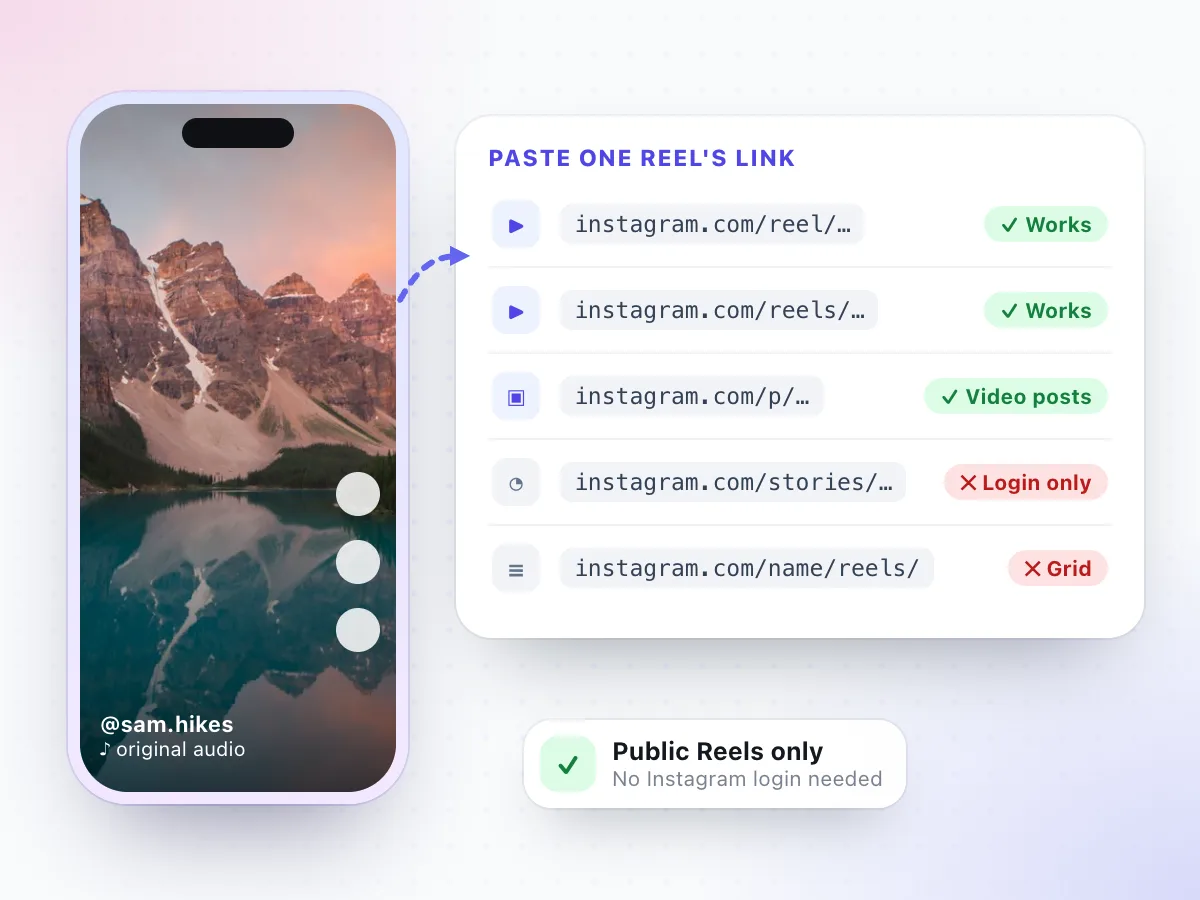
A Reel has two kinds of address. Copy link in the app gives you instagram.com/reel/ followed by a short code. Open the same Reel from the Reels tab on a computer and the address bar may show instagram.com/reels/ instead. Both point to the same video, and both work here.
Video posts in the feed use instagram.com/p/, and those work too. What doesn't work is any link that leads to more than one video or needs a login: a profile's Reels grid, a Story, or a Highlight. Open one Reel, copy that Reel's link, and paste it on its own.
- Reel links: instagram.com/reel/…
- Reels tab links: instagram.com/reels/…
- Video posts: instagram.com/p/…
- Profile Reels grids, Stories and Highlights
Where to Copy a Reel's Link
Reels show up in four places on Instagram. The Share icon looks the same in each, and it always copies the link to that one Reel.
The Reels tab
Swipe to the Reel you want, tap the paper-plane icon on the right, then Copy link.
A working link looks like
- instagram.com/reel/…
Your home feed
Reels in the feed have the same Share icon under the video. Tap it and choose Copy link.
A working link looks like
- instagram.com/reel/…
- instagram.com/p/…
A profile's Reels
On a public profile, open the Reels tab, tap one Reel so it plays full screen, then share and copy.
A working link looks like
- instagram.com/reel/…
Sent to you in a DM
Tap the Reel in the chat so it opens full screen, then use Share › Copy link. Reels from public accounts work; private ones don't.
Extra text after the ?
Copied links often end in ?igsh=… or ?utm_source=…. That's tracking, and you can paste the link as it is.
On a computer
Click the Reel so it opens in its own view and copy the address bar. On some layouts the … menu also has Copy link.
What You Get When You Save a Reel
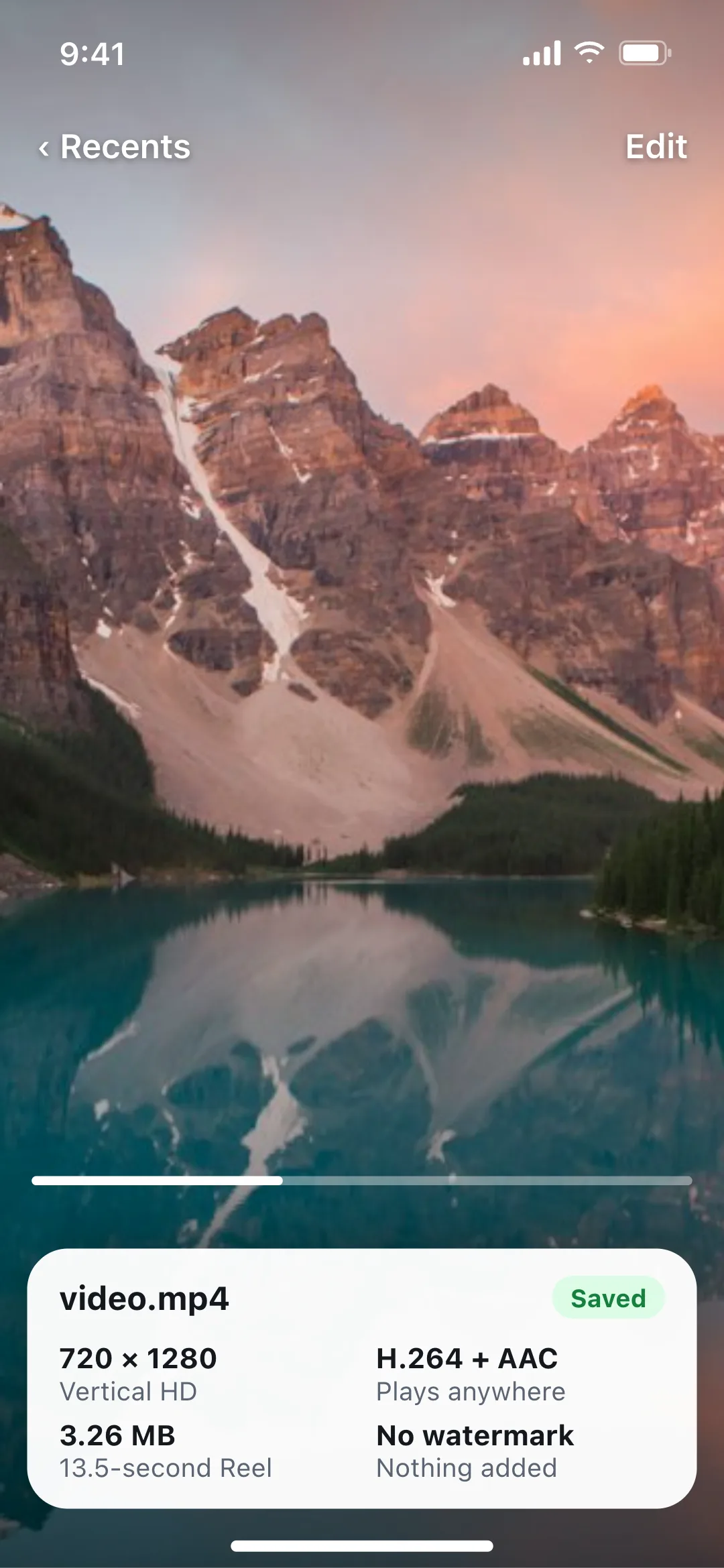
Reels are filmed vertical, and Instagram hands them to downloaders as one ready-made MP4. We pass that file straight to you, so the Reel you save is the Reel Instagram plays, with nothing re-compressed and no logo stamped on top. Here is what that file looked like in our tests:
| File type | MP4 (Instagram's own file, not re-encoded) |
|---|---|
| Resolution | 720 × 1280, vertical 9:16 |
| Video | H.264 |
| Audio | AAC at 128 kbps, when the Reel has sound |
| Watermark | None added: no Instagram logo, no username |
| Example size | A 13.5-second Reel was 3.26 MB |
| Cover image | 720 × 1280 JPG, as a separate download |
The option shows as Original · MP4 because Instagram offers a single combined file rather than a list of sizes. Instagram also doesn't report a Reel's length to downloaders, so you'll see “Estimated size unavailable” before you tap Download. More on resolutions in 720p vs 1080p vs 4K.
Reels with Music, Original Audio and No Sound
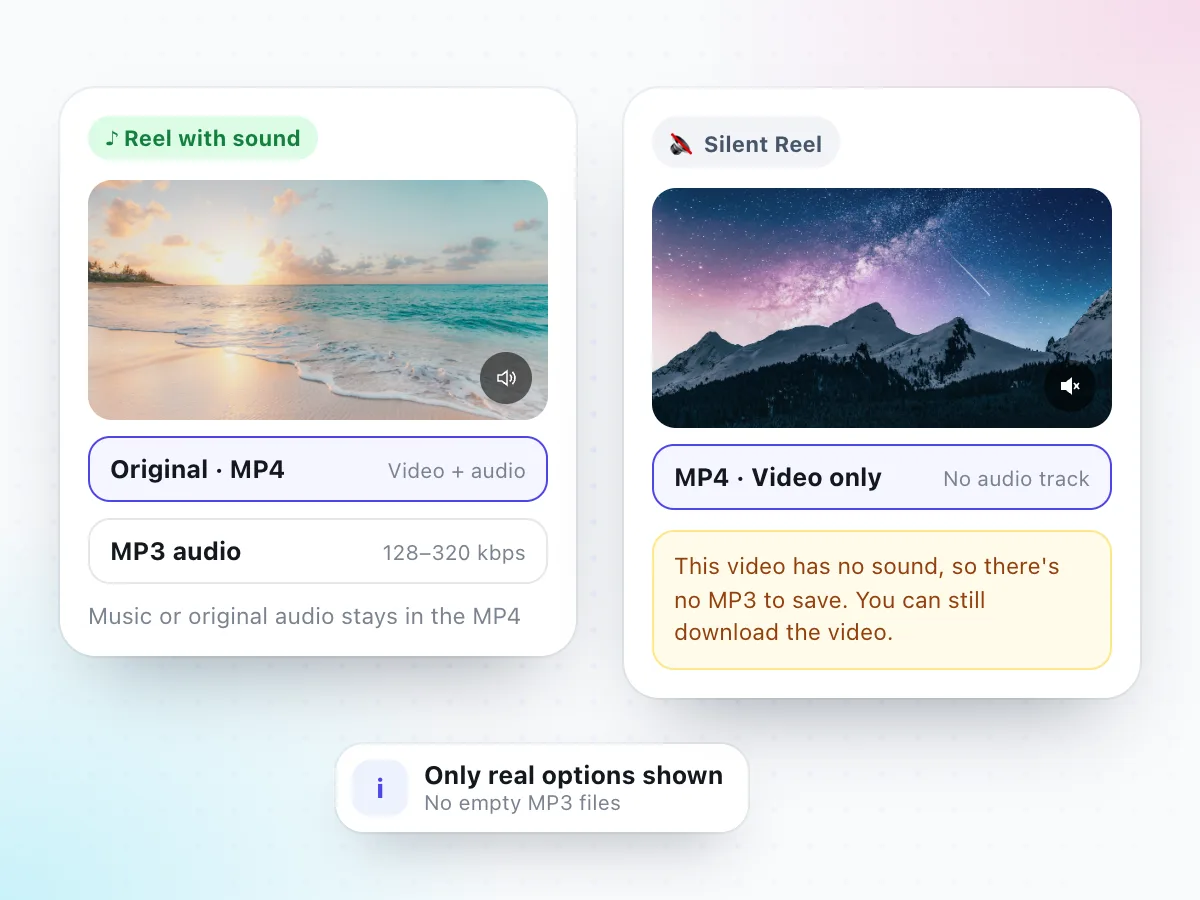
Most Reels play with a song from Instagram's music library or with original audio recorded by the creator. Either way, the sound is already mixed into the video, so the MP4 you download plays exactly as the Reel did, music and voice together.
Want only the sound? Switch to Audio (MP3) after the Reel is found, or use the dedicated Instagram audio downloader to save it at 128 to 320 kbps. The MP3 contains the whole soundtrack; music and talking can't be pulled apart.
Some Reels have no sound at all. For those, the downloader shows a short note and offers the video only, because there is nothing to turn into an MP3. A Reel that sounds muted in the app but has music listed under the username does have audio; check that your phone isn't on silent.
Instagram's Save, Download and Remix vs. a Reels Downloader
Instagram gives you a few ways to hold on to a Reel. They're useful, but none of them is the same as having the clean video file.
Save (bookmark)
Adds the Reel to your Saved collection inside Instagram.
It isn't a file. It only plays in the app, and it disappears if the creator deletes the Reel.
Instagram's Download option
On some public Reels, the Share menu offers a download to your camera roll.
It's only there when the creator allows it, and the saved video carries Instagram branding and the creator's username.
Remix
Lets you record your own Reel next to or after someone else's.
It makes a new Reel on your account. You don't get the original video as a file.
Screen recording
Records whatever is on your screen while the Reel plays.
You also capture the buttons, captions and notifications, and the quality depends on your phone.
Use Save when you just want to watch a Reel again later. Use a Reels downloader when you need the video as a file: to keep your own Reels backed up, to edit a clip you have permission to use, or to watch offline without the app.
How to Save Instagram Reels on iPhone, Android and PC
The Reels downloader works the same in every modern browser. Only the place the file lands is different.
iPhone and iPad
Copy the Reel link in Instagram, open this page in Safari, paste and tap Download. Open Files › Downloads, tap the video, then Share › Save Video to put it in Photos.
Saved to: Files app › Downloads
Android
Copy the link, open this page in Chrome, paste and tap Download. The Reel usually shows up in your gallery app straight away, or in the Files app under Downloads.
Saved to: Downloads folder
Windows and Mac
Open the Reel on instagram.com, copy the URL, paste it above and click Download. The vertical MP4 opens in any player or video editor.
Saved to: Your browser's Downloads folder
Every Reel saves as video.mp4. Rename each one, for example with the creator's name, before you save the next, so they don't end up as video (1), video (2) and so on.
Reposting Reels: Permission, Credit and Music
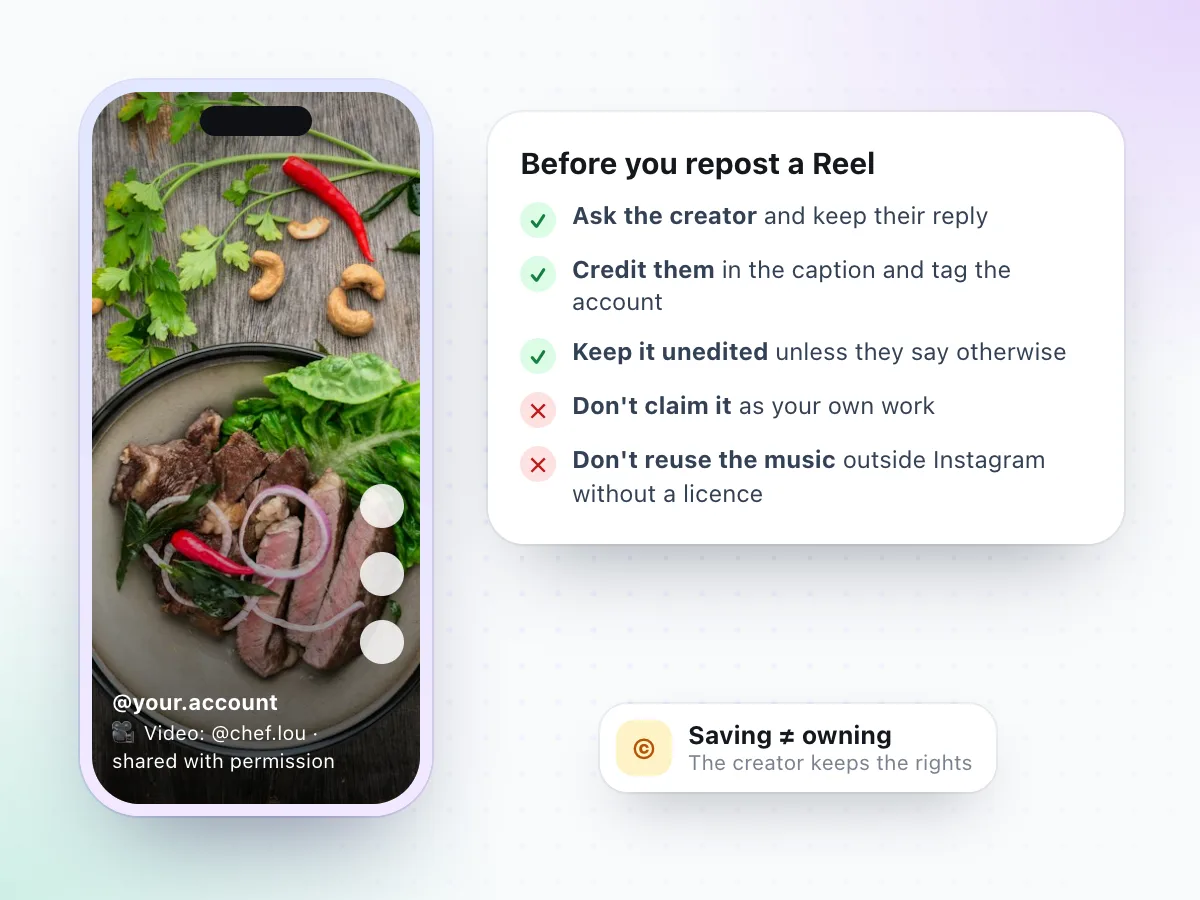
Downloading a Reel doesn't make it yours. The person who filmed it keeps the rights, so reposting it to your own account, a page you run or another app needs their permission first.
When a creator says yes, credit them clearly in the caption and tag their account, and keep their reply in case anyone asks. Don't crop out their name, add your own logo or present the video as your work.
Music needs extra care. Songs in Reels are licensed for use on Instagram, which doesn't cover putting the same track in a video elsewhere. Your own Reels are the simple case: saving them is a good way to keep a backup before you edit or delete a post.
More You Can Do with an Instagram Link
The Reels downloader saves the video. These pages handle the other parts of an Instagram post.
Reel Won't Download? Common Fixes
The usual reasons a Reel can't be saved, and what to try. For anything else, read why a video download is not working.
"This content may be private"
The account is private, or Instagram refused the request. Check the Reel opens in a browser where you're logged out.
It worked a minute ago
Instagram sometimes turns away requests that come without a login for a while. Wait a few minutes and try the link again.
You pasted a profile or Story
Only links to a single Reel or video post work. Open one Reel and copy its own link.
No MP3 option appears
The Reel has no sound track, so only the video is offered. That's the Reel, not a fault.
A post with several videos
Carousel posts save their first video. For photos in a carousel, use the Instagram photo downloader.
Nothing happens on iPhone
Use Safari, then look in Files › Downloads. Safari saves files there even when no prompt shows.
Why Use This Reels Downloader
Six reasons, each one something we checked with real public Reels.
The real Reel file
You get the 720 × 1280 MP4 Instagram serves, not a screen recording or a re-compressed copy.
No watermark added
No Instagram logo, no username and no mark from us on the saved video.
Sound kept intact
Music, original audio and voiceovers stay in the MP4, with an MP3 option when the Reel has sound.
No Instagram login
We never ask for your account. Public Reels are read the way a logged-out visitor sees them.
Works in the browser
A web-based Reels downloader for iPhone, Android, Windows and Mac. Nothing to install.
Honest about limits
Private accounts, Stories and Highlights don't work, and the page says so up front.
Instagram Reels Downloader FAQ
How do I download Instagram Reels?
Open the Reel, tap the paper-plane Share icon and choose Copy link. Paste the link into the box at the top of this page and select Check Video Link. Keep Original · MP4 selected and tap Download. The Reel saves as video.mp4 on your phone or computer.
Is this Instagram Reels downloader free?
Yes. There is no charge, no sign-up and no limit on how many public Reels you can save, apart from a short pause if too many requests come in at once.
What quality are downloaded Reels?
In our tests Instagram served Reels as a 720 × 1280 MP4 with H.264 video and 128 kbps AAC audio, and that's the file you get. We don't upscale it or relabel it as 1080p or 4K.
Do saved Reels have a watermark?
No. The downloader saves the clean video Instagram plays, so there's no Instagram logo or username on it, and we don't add a mark of our own.
Can I download Reels with the music?
Yes. The MP4 keeps the Reel's sound exactly as it plays, whether that's a song, original audio or a voiceover. If you only want the sound, use the Instagram audio downloader to save it as an MP3.
Why does a Reel have no MP3 option?
Because it has no sound track. Some Reels are uploaded silent or with the audio removed. The downloader tells you so and offers the video only, instead of making an empty MP3.
Why is there no file size before I download?
Instagram doesn't tell downloaders how long a Reel is, so we can't estimate the size in advance. As a guide, a 13.5-second Reel we tested came out at 3.26 MB.
Can I download Reels from a private account?
No. Only public Reels work. If the account is private, the Reel can only be seen by its approved followers, and we don't log in to get around that.
Can I save Instagram Stories or Highlights here?
No. Stories and Highlights need an Instagram login to view, and this tool never uses one. A Reel shared to a Story can be saved from the Reel's own link.
Do I need to log in or install an app?
Neither. The Reels downloader runs in Safari, Chrome, Edge or Firefox and never asks for your Instagram password. Be wary of any site or app that does.
Is it legal to download Instagram Reels?
Saving your own Reels, or Reels you have permission to keep, is the safe case. Reels belong to their creators, and music in them is usually licensed for Instagram only, so don't repost or reuse someone else's Reel without asking.
Saving a video post rather than a Reel? The Instagram video downloader covers those too. For the sound only, try the Instagram audio downloader, and for pictures the Instagram photo downloader.
Have a Reel link?
Paste it at the top of the page and save the Reel as an MP4 in a few seconds.
Download a Reel